Synthetic contributors
Adding an AI perspective to human conversations
How do you design a space where AI thinks alongside people by enriching the debate? This meant working through unfamiliar interaction patterns and designing for trust and transparency. An explorative bet, tested with five enterprise customers.
- Discovery
- Product Strategy
- Visual Design
Context
Back in 2024, like many product teams, my team and I were looking into AI. We were debating for months whether AI belonged in our product at all, and if so, how.
We built Nyord to help companies tap into their collective intelligence. Used in culture change and transformation projects, it gives large groups, often hundreds of people, a structure to work through hard problems together, by sharing ideas, offering different perspectives and building on each other’s input. The value is in people taking ownership of the outcome. That’s why we didn’t want AI to offer a cheap shortcut to the answers, or do the thinking for them. The question was: How could artificial intelligence add to collective intelligence – in other words, help people think better together?
In our early-stage team of five, I was one of three co-founders and the only designer. Together, we decided where to take Nyord. My role was translating that into the product’s design, from strategy down to the last pixel.
The product bet
By early 2025, one direction we had been discussing for a while was the idea of synthetic contributors: AI-generated participants that could post, rate and comment on ideas just like human participants. Our hypothesis was that these could bring in missing perspectives and expert knowledge – an absent customer, a devil’s advocate, a legal expert – that would otherwise have been hard to get into the room.
We realized it could also help us solve a specific challenge: Facilitators, the users who set up and run the co-creation sessions, would hesitate to invite the whole group, often dozens of people, before getting familiar with the tool. They were nervous – what if people wouldn’t get it? Until then, facilitators had no way to experience it from the participant’s side. But with synthetic contributors, they could just do a dry run on their own.
We talked about the idea with several of our enterprise customers we had been working closely with. The feedback was positive enough that we decided to develop an initial version and give it to them for testing, to learn if this direction deserved further investment.
Where AI contributors fit
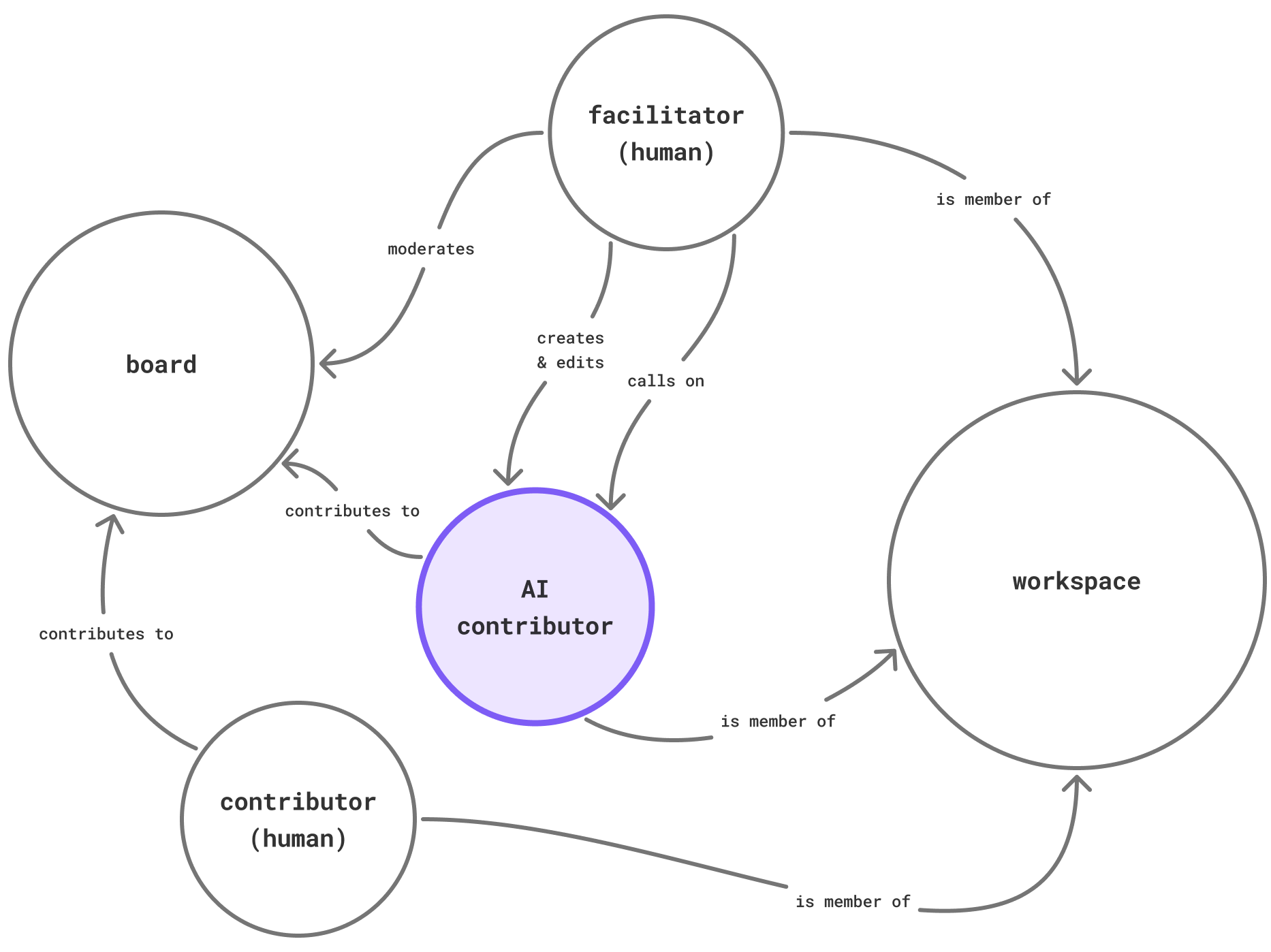
I started by thinking about how this new kind of participant – we called it an AI contributor – would fit into how collaboration works in Nyord. Where does it live? How does it relate to human contributors? How does it join or leave a session?
Going back to the mental model of the workshop Nyord is built around (participants organized in a workspace collaborate on boards), I figured that, like other participants, AI contributors should be members of the group’s workspace. A facilitator can add them to a session like inviting a guest and call on them to post an idea, rate inputs or give feedback.
Principles, permissions and lifecycle
AI contributors had to feel like actual workshop collaborators to do what they were meant to do: inspire, push, criticize. We had to give them room to surprise. That meant, unlike most AI tools, we would not allow users to edit, regenerate or tweak AI output. Like a human’s contribution, AI output should not be editable.
However, human participants had to understand at all times when an idea or feedback was AI-generated, and be able to trace it back to the AI contributor’s instructions and its creator, so they could put it into perspective.
And last, the AI contributors should not be able to act autonomously, but only when called on by the session’s facilitator.
Based on these considerations, I established three principles:
- AI output can’t be edited.
- AI output is marked and traceable to its source.
- Control always stays with humans.
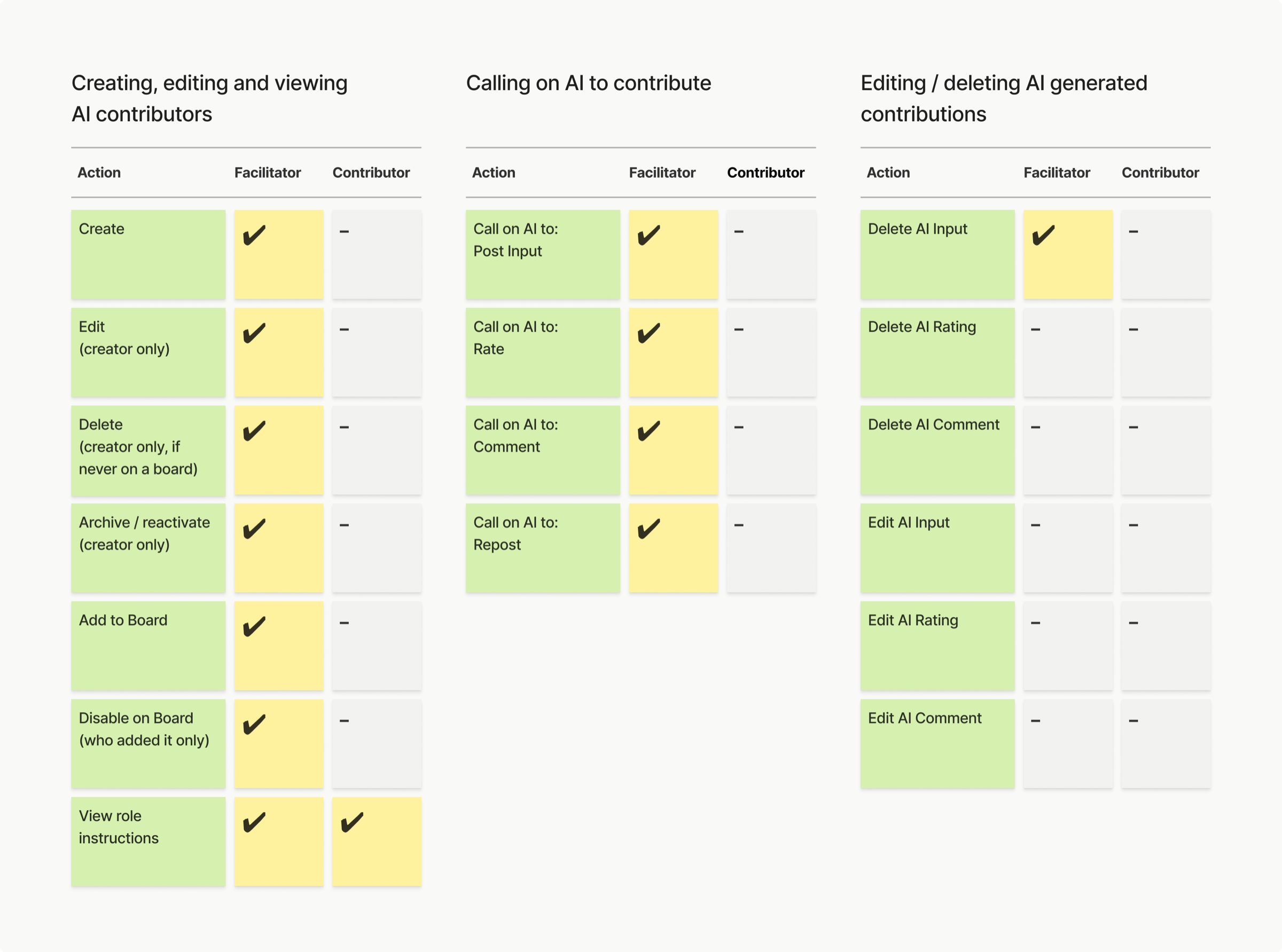
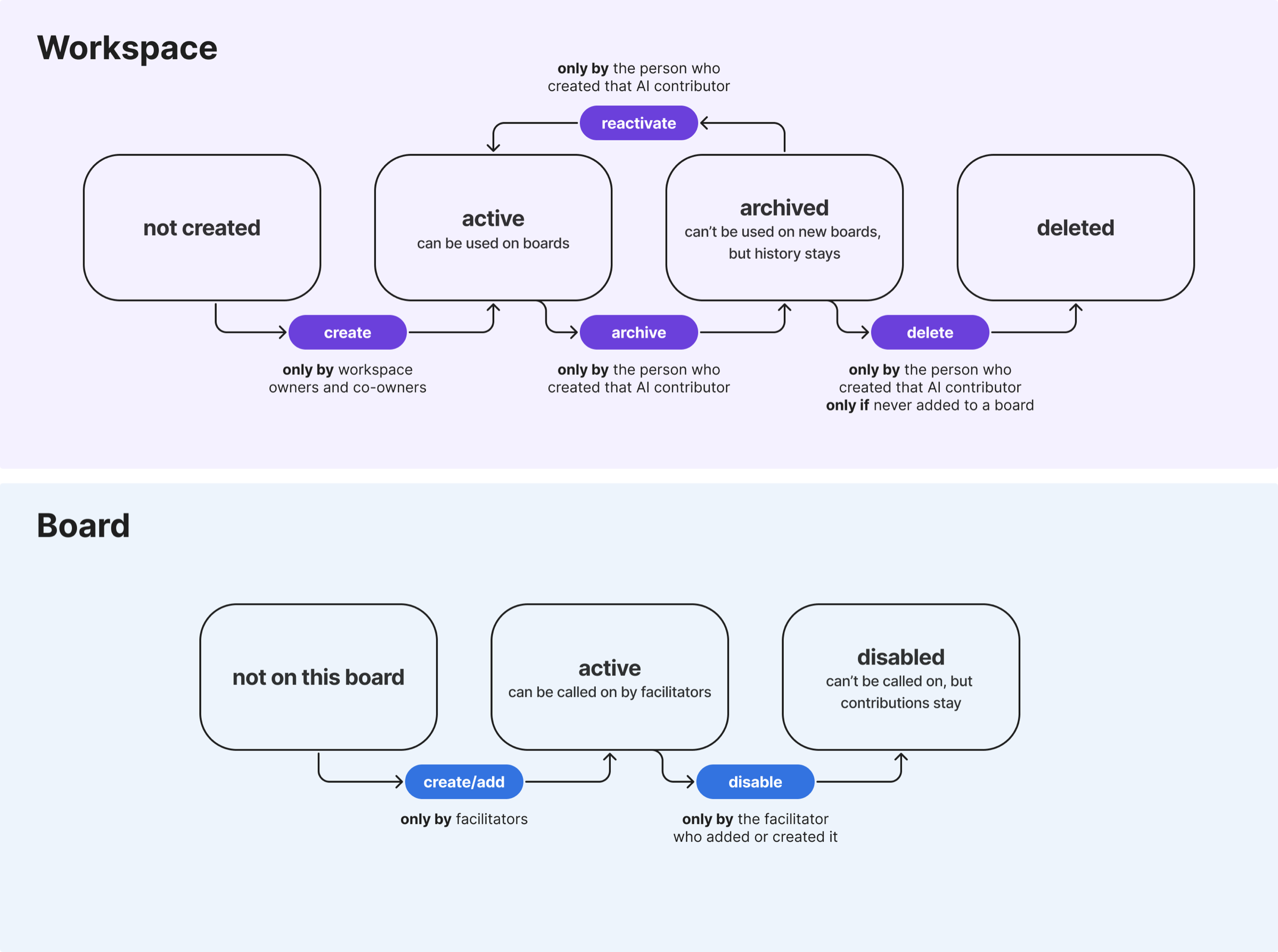
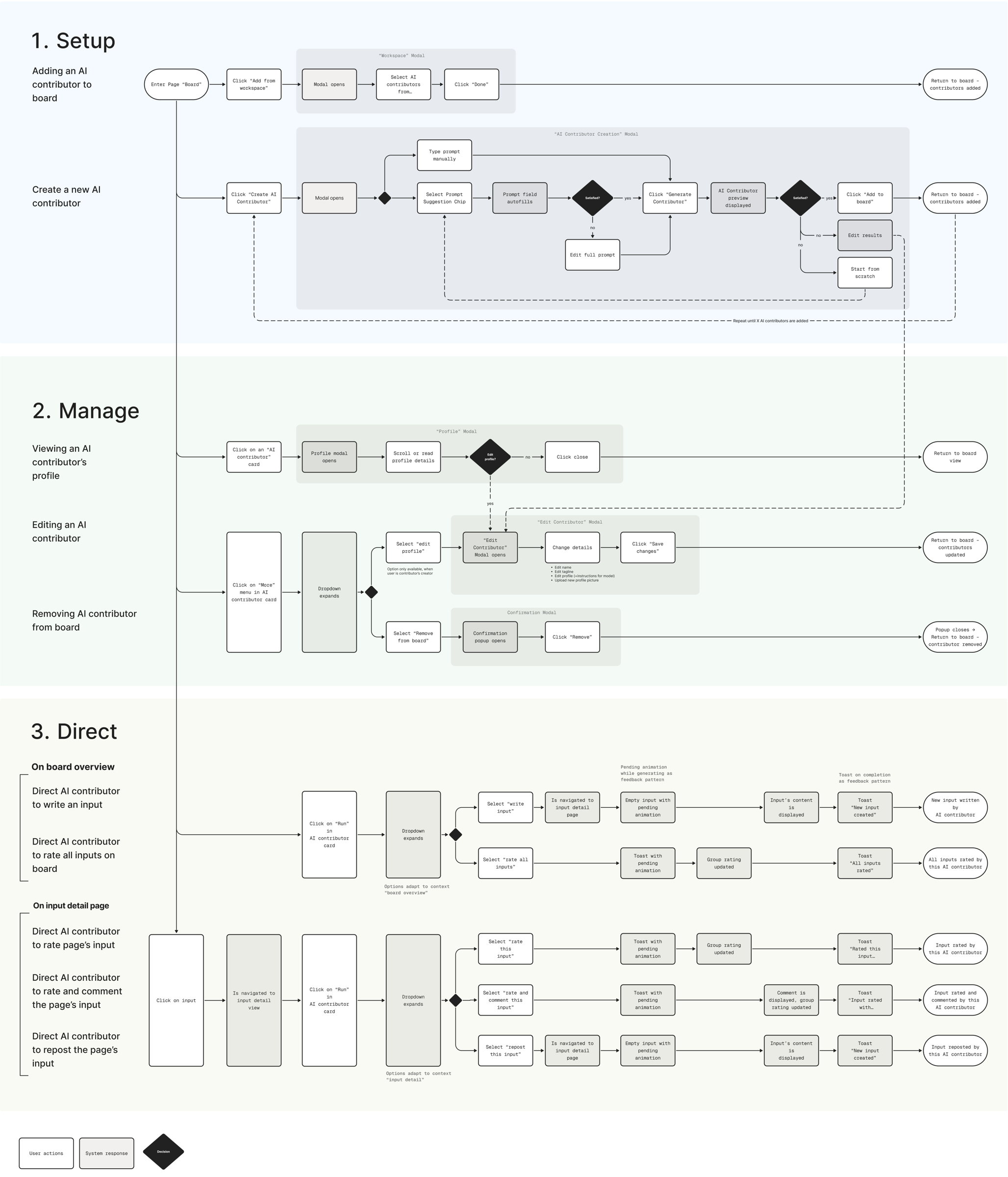
From there, I defined role-specific permissions for who can direct an AI contributor and who can view or edit its instructions. I mapped out the lifecycle of an AI contributor, how its status would change across the workspace and individual boards.
How users interact with AI
I mapped out how facilitators could create and edit, add and remove, and finally direct AI contributors. Working through the task flows, made me realize that the flow for the facilitator would be more natural if the options to direct an AI contributor mirrored what a human participant does: posting and rating on the board overview, reacting to an input with rating, commenting or reposting on the input detail page.
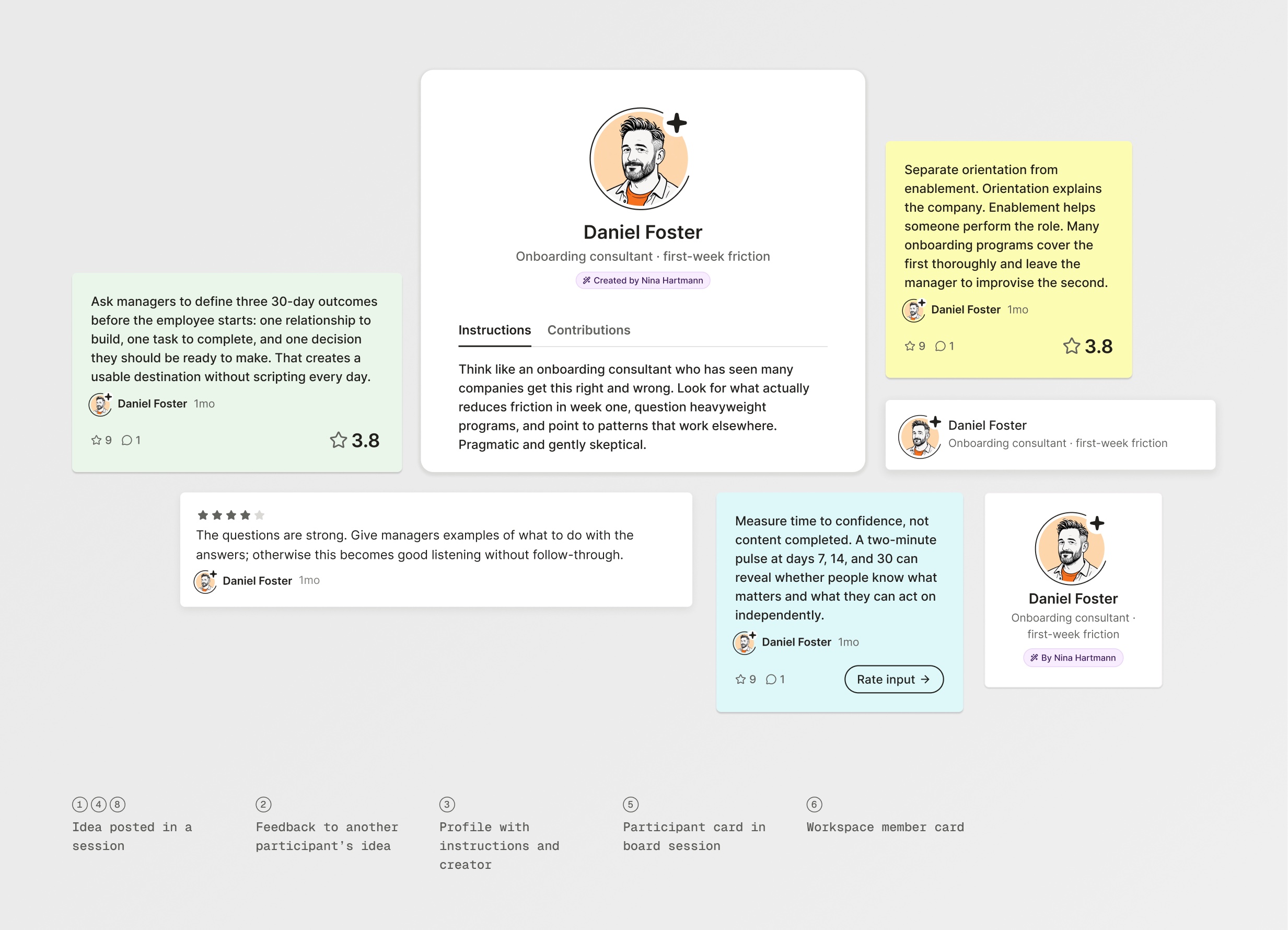
Like human workspace members, each AI contributor has a profile that can be opened through the participant list or the member list. While a human participant’s profile can display an “About me” text, the AI contributor’s profile displays its instructions and creator, so everyone in the session can trace an AI’s output back to its source.
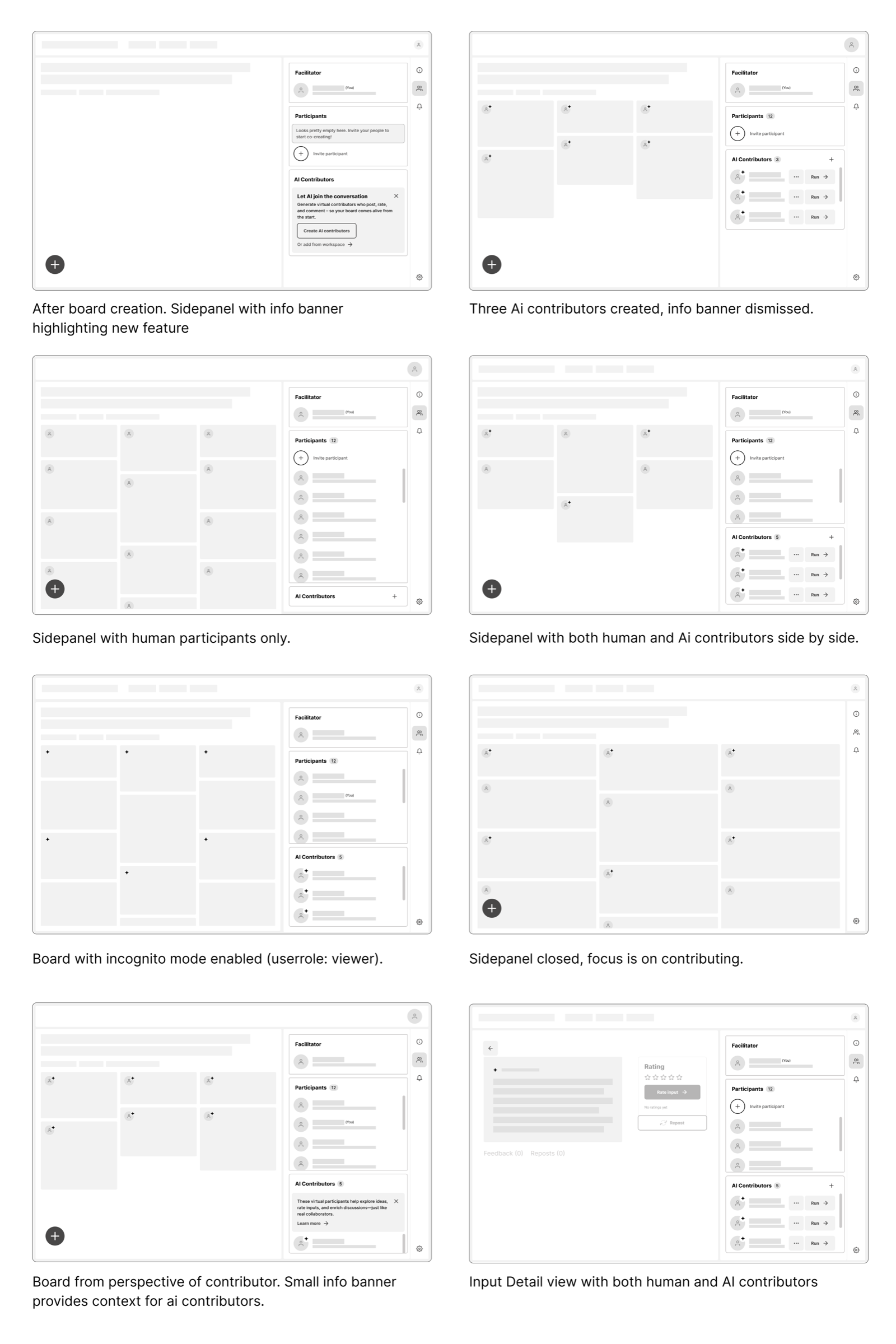
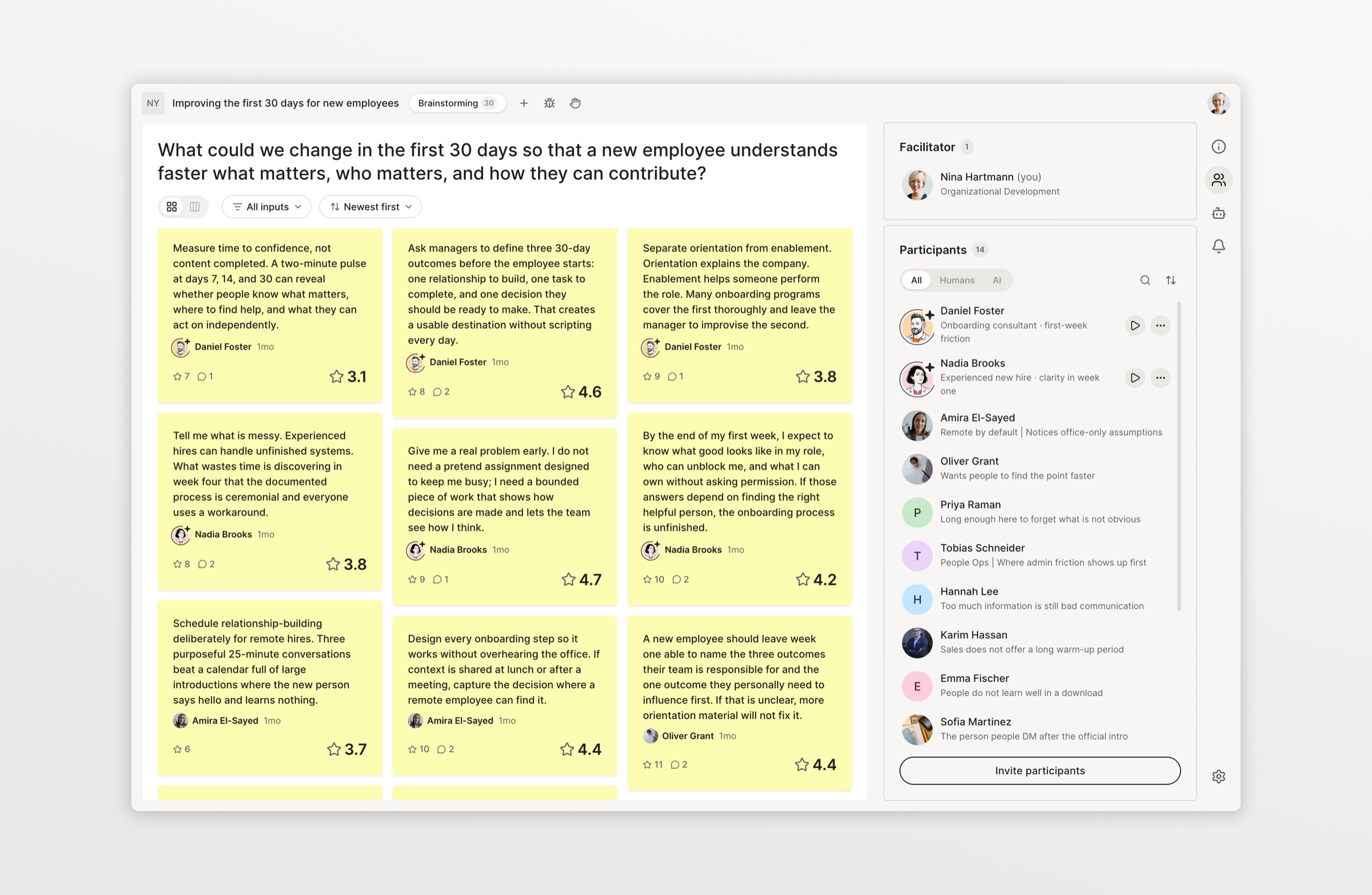
I placed the AI contributors within a collapsible side panel, together with human participants. The interface now depended on the user role, whether AI contributors were already part of the session, and board settings like incognito mode. I worked through these combinations by mapping each state out in wireframes.
Onboarding and first steps
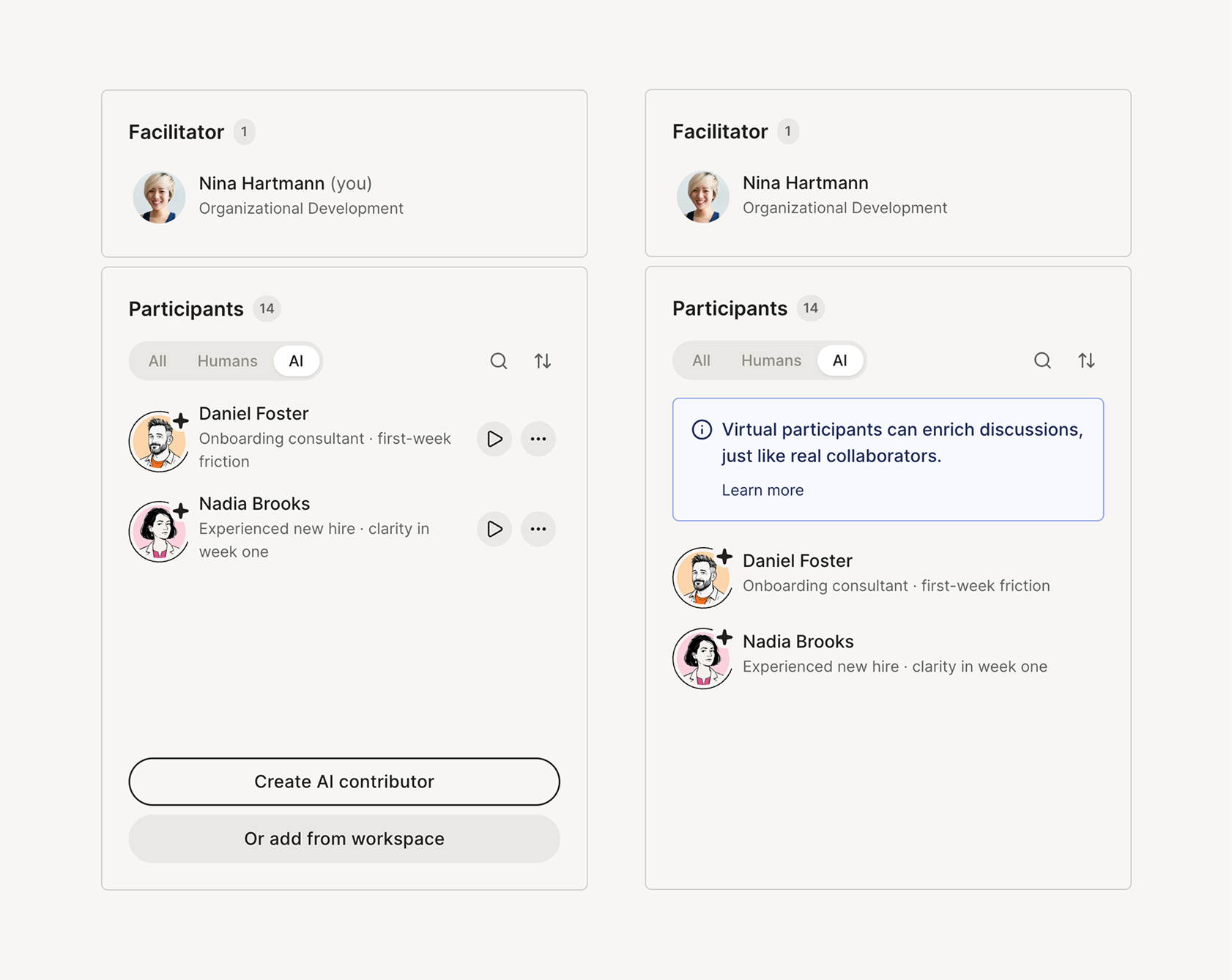
The onboarding had to work differently for users with different roles. For facilitators, it was mainly about learning how to create AI contributors and let them act, for contributors it was about making it understandable, what this entity was and what to make out of their contributions.
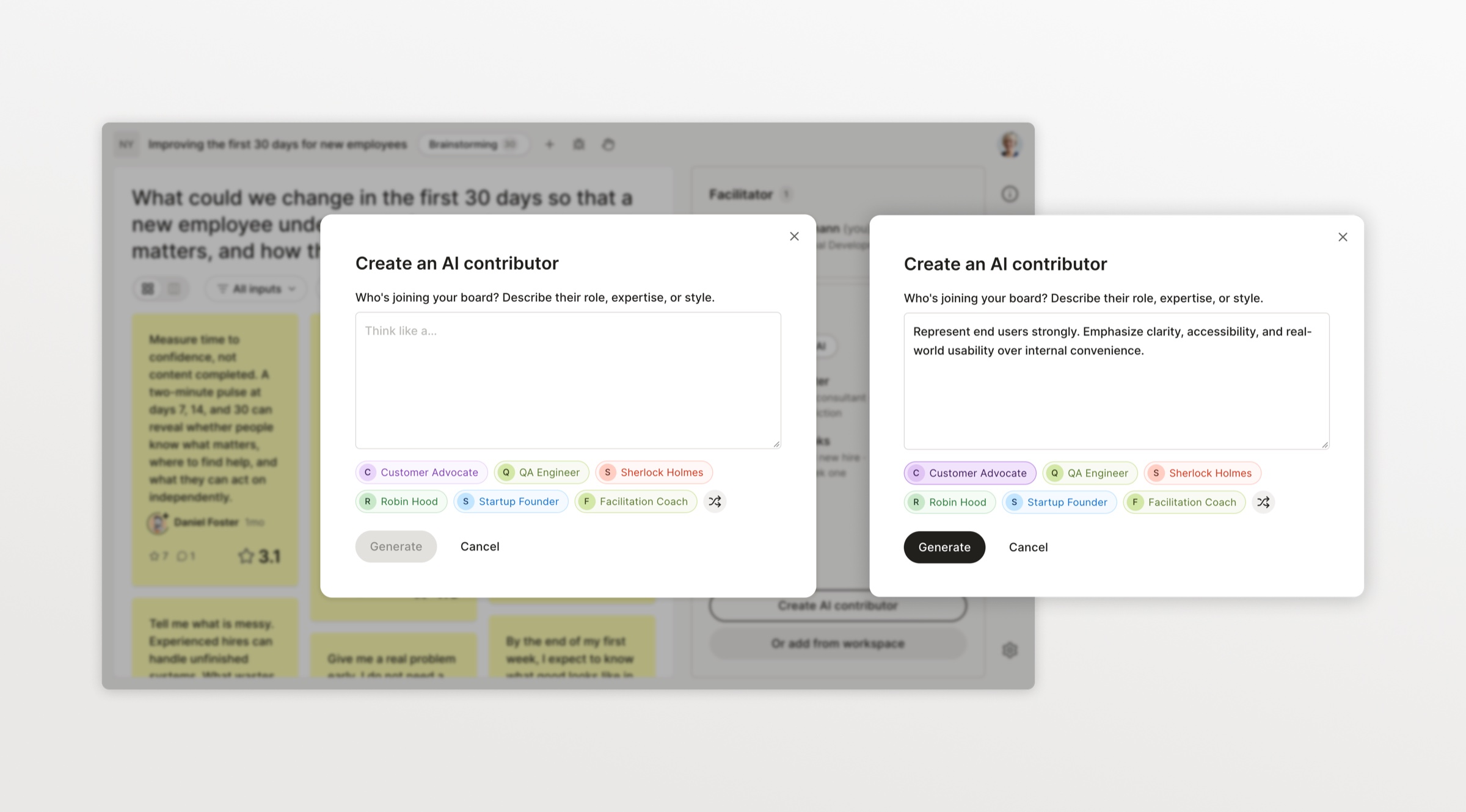
To create an AI contributor, facilitators faced an empty instructions field – a classic blank page problem. How could I help users get started fast?
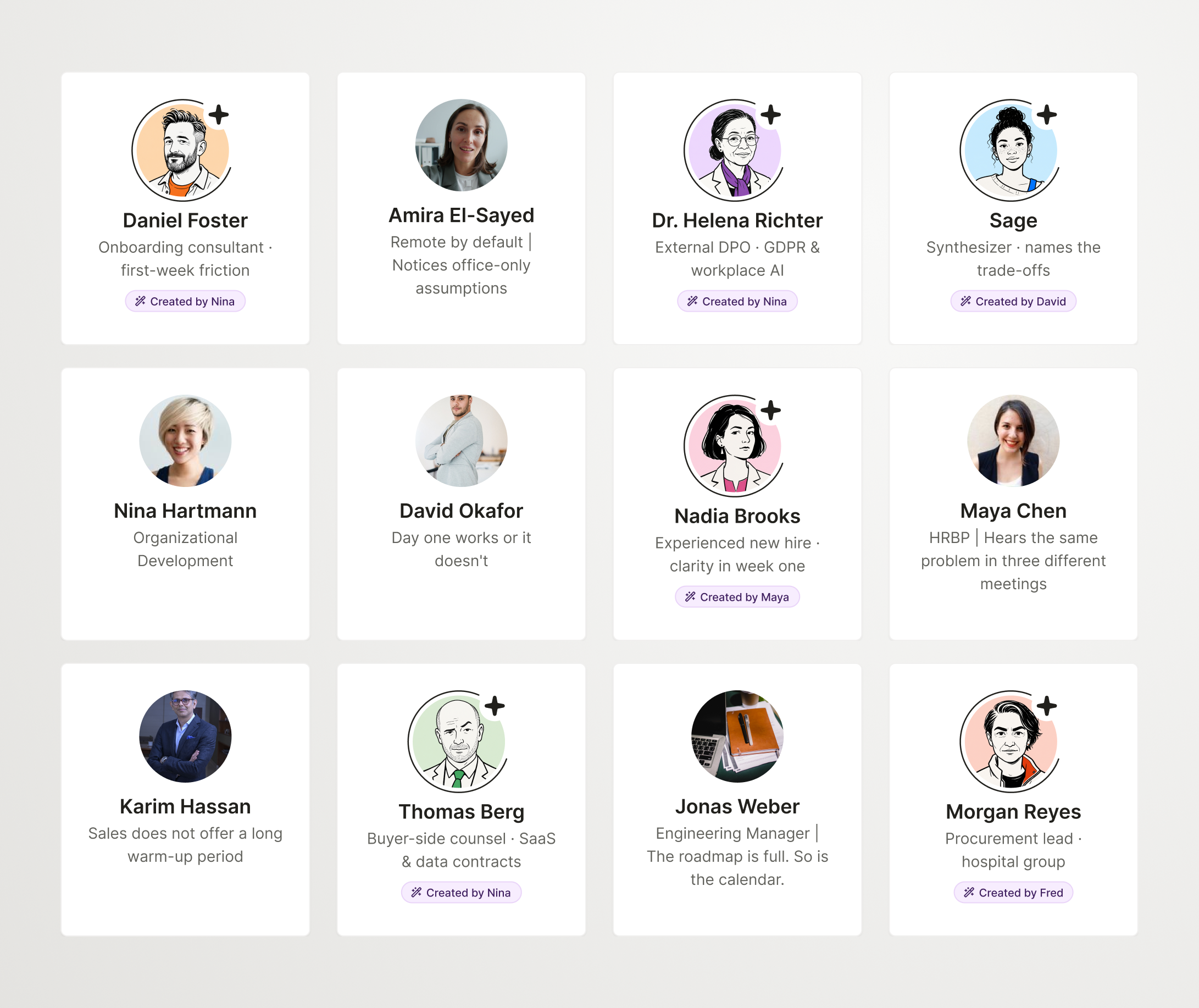
I developed 35 personas, from typical roles (a critical investor, a marketing expert) to historical figures and even fictional characters like Sherlock Holmes or Robin Hood. Below the instructions field, a random selection appeared as suggestions; one click filled in the full instructions, ready to use or adjust.
This let users try out the feature right away, and also showed them by example how to write instructions so they would get the most out of an AI contributor. Our first tests showed that almost everyone started from a suggestion, a sign that the help was welcome.
Visualizing AI contributors and their output
Our principles required AI contributors and their output to be recognizable as AI at a glance. At the same time, they should feel like individuals, distinct from each other, but clearly not human.
A challenge was that avatars were generated from the user’s instructions, but people describe a role or skill, not age, gender or personal quirks. So at first, every avatar ended up looking the same, very generic, often stereotypical.
The solution was to put several steps in between the user’s instruction and the image model: first a casting step, where a separate model would create the description of a distinct persona, then a step that would add randomness – glasses, hairstyle, beard etc.
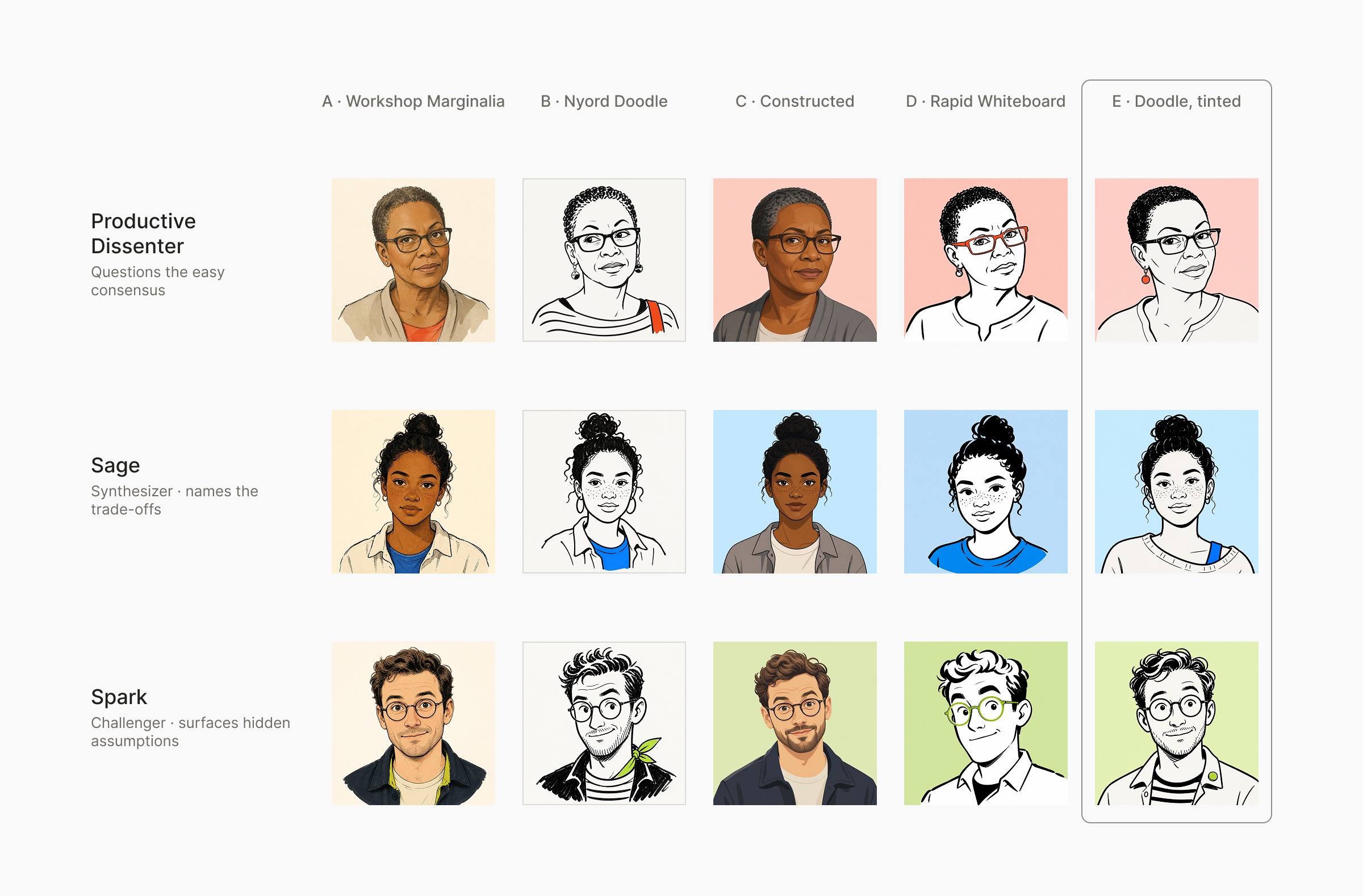
To experiment with visual styles, I built an avatar style lab to compare art directions. Finally I decided on an art direction based on the idea of a quick whiteboard sketch – it conveys a distinct character, but doesn’t mimic an actual person. The hand-drawn style fits Nyord’s design language, and the tinted background works on any surface.
To make AI contributors instantly recognizable as AI, I added a sparkle to their avatar, a familiar AI signal, plus a dark partial ring that keeps them distinct even at small sizes, like on a post or comment.
Impact
We released the feature to five of our customer organizations, all companies, we had discussed the feature with before.
The biggest impact for us was that facilitators using this feature were about 1.6 times more likely to invite team members than users without access to the feature. Qualitative interviews showed that getting comfortable with the product before involving others really lowered the barrier for them to launch larger sessions.
One unexpected finding was that users actually liked using AI contributors for solo exploration: to stress-test ideas or brainstorm in a safe place.